New Releases and Upgrading Versions
In most cases, updating InRule for Salesforce is a relatively straight forward process. You will effectively follow the same order of operations of the initial installation steps outlined in this project.
The components that will need to be upgraded are:
- irAuthor
- Azure Rule Execution Service
- InRule for Salesforce App
All 3 of these components must be upgraded in all upgrade scenarios, and all three must be upgraded to the same version.
If you're upgrading a version that's not the latest, keep in mind that you'll need to use a versioned package link for the InRule for Salesforce App – App Exchange only offers the latest version. This distinction is discussed in more detail in InRule for Salesforce App. The link provided in that section is for the version matching the version of this document. If you need an older version than this document's version, do not use that link. You'll need the Deployment Guide for that version.
This appendix discusses some special cases and considerations to be aware of when upgrading.
Release History
| Version | Status | Release date | Description |
|---|---|---|---|
| v5.9.0 | RELEASED | Nov 2025 | Upgraded Salesforce execution service to .NET 8.0. Added support for Primary/Secondary API Key, Client Credentials auth, and use of Scheduled Trigger Flow. Updates to Salesforce API content and theme. |
| v5.8.1 | RELEASED | May 2024 | New auth type allowing API key-based named credentials, irAuthor Salesforce login fixes, RuleHelper fixes |
| v5.8.0 | RELEASED | Nov 2022 | Maintenance Release |
| v5.7.3 | RELEASED | Apr 2022 | Azure Marketplace listing, DecisionClient callable from REST, RuleHelper query and caching enhancements |
| v5.7.2 | RELEASED | Jun 2021 | InRule for Salesforce configuration in SaaS Portal. Salesforce API limit fixes |
| v5.7.1 | RELEASED | Maintenance Release | |
| v5.7.0 | RELEASED | Feb 2021 | Expanded execution options for Decisions and Version Labels, data loading performance improvements, Call InRule from Lightning Flow, advanced irX OAuth login flow |
| v5.6.0 | RELEASED | Jun 2020 | InRule App on the AppExchange, InRule App content and configuration pages, 'Test Connectivity' button, DecisionClient enhancements |
| v5.5.1 | RELEASED | Feb 2020 | Maintenance Release |
| v5.5.0 | RELEASED | Dec 2019 | AppInsights logging, Execution App Service endpoint overrides |
| v5.4.1 | RELEASED | Jun 2019 | Maintenance Release |
| v5.4.0 | RELEASED | May 2019 | ARM Template, hosted InRule App package deployment |
| v5.3.0 | RELEASED | Feb 2019 | Maintenance Release |
| v5.2.0 | RELEASED | Oct 2018 | Rule Execution Azure App Service for Salesforce |
Version Compatibility Considerations
This list includes specific fixes or changes included in releases. Issue number and title are included here, but you can refer to the release notes section of the support site for further information: Decision Platform Release Notes – InRule Technology. This page includes release notes for all InRule products, but Salesforce release notes will be prefixed with "SF"
Again, when upgrading to a new version, irAuthor, InRule for Salesforce App, and the Azure Rule Execution Service should always be upgraded together
| Issue Number | Version | Description |
|---|---|---|
| PLAT-1125 PLAT-512 | 5.9.0 | Salesforce execution service upgraded to .NET 8. Client Credentials is the new recommended authentication flow to authenticate with Salesforce suitable for service-to-service connectivity. This enables a simpler configuration than User/Password Credentials. |
| SFC-279 | 5.8.1 | A new configuration setting, Auth Type, has been added. For existing users upgrading to 5.8.1, this setting will be set to basic username/password authorization. Authorization credentials configured in the Named Credential must now match the Auth Type configured for the Rule Execution Service. |
| SFC-278 | 5.8.1 | Added support for the new Named/External Credentials introduced by recent Salesforce updates. Named Credentials that existed prior to these updates are now referred to as Legacy Named Credentials and should be deleted once the new credentials have been configured. |
| SFC-272 | 5.8.1 | Added support for Webview2 to the irAuthor Salesforce login, resolving an issue with lightning-based login URLs such as https://your-username.lightning.force.com. Webview2 will now be used to render the login page if the runtime is present. If the runtime is not present, the legacy implementation will be used. A new warning log was added when the runtime is not detected. |
| SFC-261 | 5.7.3 | Added ruleAppLabel parameter to execution service arm template. By default this label is empty. No ruleAppLabel will result in the most recent version of a rule app being used. Customers relying on a label to denote the production ready version of a rule app, such as the LIVE, will want to add the production label to the arm template prior to upgrade deployment. |
| SFC-48 | 5.7.0 | Added improvements to the Inrule Log Entity. Views will need to be manually updated to take advantage of these updates. |
| SFC-126 | 5.7.0 | Added support for interactive login to irX, allowing login without requiring the Salesforce API token and the Consumer Secret/Key. This also enables support for MFA authentication. |
SaaS Upgrades
For SaaS customers, the upgrade process will be communicated to you by InRule via email. Keep an eye out for these communications, as they will be the primary source of guidance around what to do in upgrade scenarios. Relevant information from these communications includes when an update will be occurring, the new features coming with the update, the maintenance times required to apply the update, and mandatory steps you'll need to take immediately following the update.
Additionally, as part of the upgrade process, InRule will make a testing environment available for a limited period of time for you to use. This is to allow a window for your organization to perform regression testing to verify that you don't experience any new issues with the new version. The upgrade communication will provide details around when the test environment is available, how to access it, and how long it will be active.
Execution Service App Settings
When running an ARM template deployment to upgrade an existing app service, the new deployment will remove all app settings that currently exist and replace them with the settings during the new deployment. Because of this, it is important to save your parameters file when you do a deployment. If you do not have your previous parameters file you can find it in the deployments section of the Azure Portal. This also means that any settings that were changed or added manually, such as logging level or endpoint overrides, will be removed.
Alternatively, current app setting values can be manually set in the ARM template parameter file prior to deployment to have the template deploy using those values. Should you go this route, be thorough during the transfer process, it is common for values to have been manually changed over time. For a thorough breakdown of the relevant parameters, reference Rule Execution App Service for Salesforce
Lastly, redeploying or upgrading via the ARM template will remove your InRule license from the resulting app service. The license file will need to be manually added back; for a walkthrough on how to do this, reference License Management.
irX Salesforce Login Updates
As of v5.7, the irX Salesforce plugin now uses web login to Salesforce, rather than the former form-based authentication configuration. This allows for simply signing into Salesforce through Salesforce's native login experience, rather than needing to configure security tokens and consumer secrets/keys within irX. Additionally, this allows for login from accounts with Multi-Factor Authentication (MFA) required, whereas MFA-required accounts were not compatible before (Note: MFA support only applies to irX. Executive service accounts with MFA required are still not supported).
If upgrading from an older version, old usernames and environments will be preserved, but users will need to re-login.
Default Rule App Label Change
As of v5.7.3, the default Rule App Label configured on the execution service has been changed from "LIVE" to not being set with a value. If a default label is not configured on the execution service, it will now default to using the most recent version of the rule app being run. This has the potential to create an issue during upgrade scenarios where users are relying on the LIVE label to denote their production-ready rule. If using the most recent version of the given rule app is not the desired outcome, the default label on the execution service will need to be set back to LIVE (or whatever the appropriate production label for your existing rule apps may be). This can be done in the ARM template prior to upgrade deployment.
InRule Log Entity
As of v5.7, updates have been made to improve the information displayed in InRule Logs. This includes updates made to the list views. Salesforce does not allow list views to be updated with a package update, so list view updates will need to be performed manually.
To update the "All" list view:
- Navigate to the InRule Logs tab
- Select the "All" list view
- Select the List View Controls
- Select the "Select Fields to Display" option
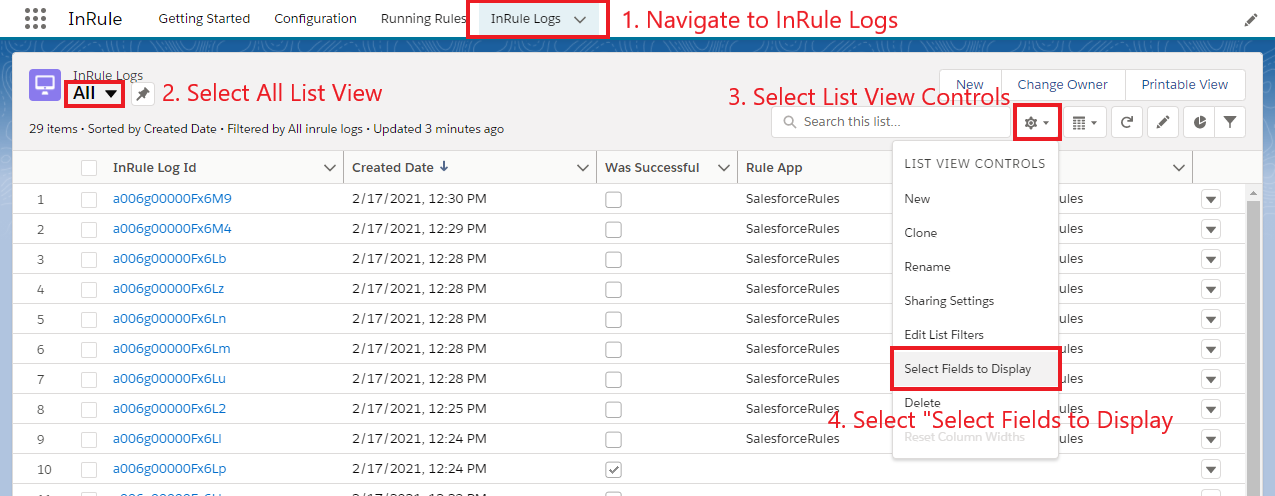
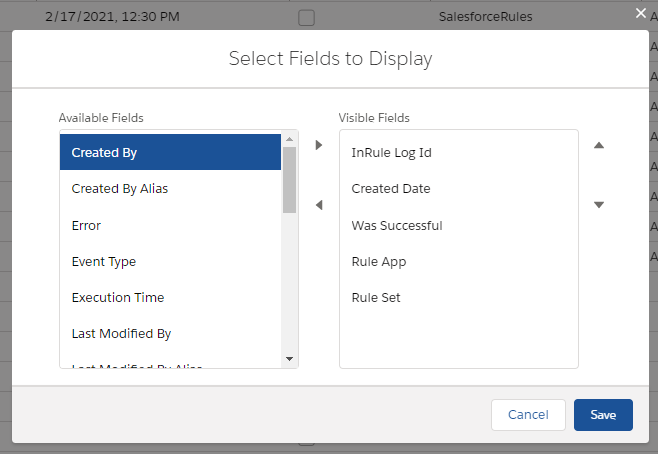
- Use the "Select Fields to Display" window to add and order fields for the All view. Below is the recommended configuration for the "All" list view.
The "Recently Viewed" list view is controlled by the Search Layout. As such updating the "Recently Viewed" list view is done by updating the Search Layout for the InRule Log object in the Object Manager.
To update the "Recently Viewed" list view:
- Select "Search Layouts" from the InRule Log Object Manager Screen
- Use the dropdown arrow for the Default Layout to select the option to Edit the Default Layout
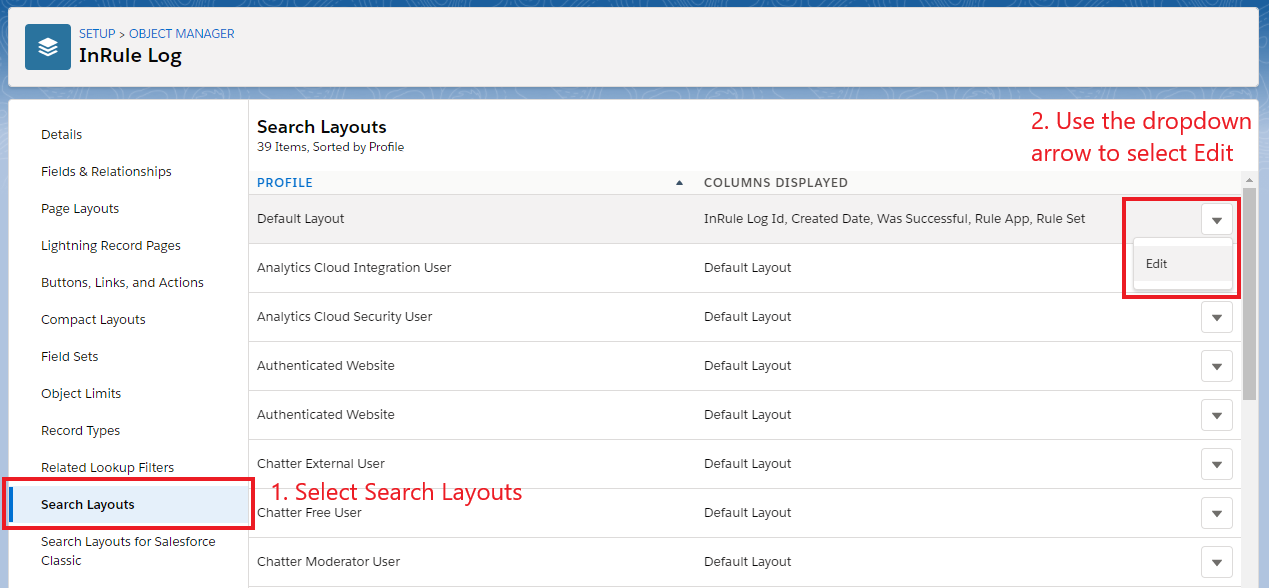
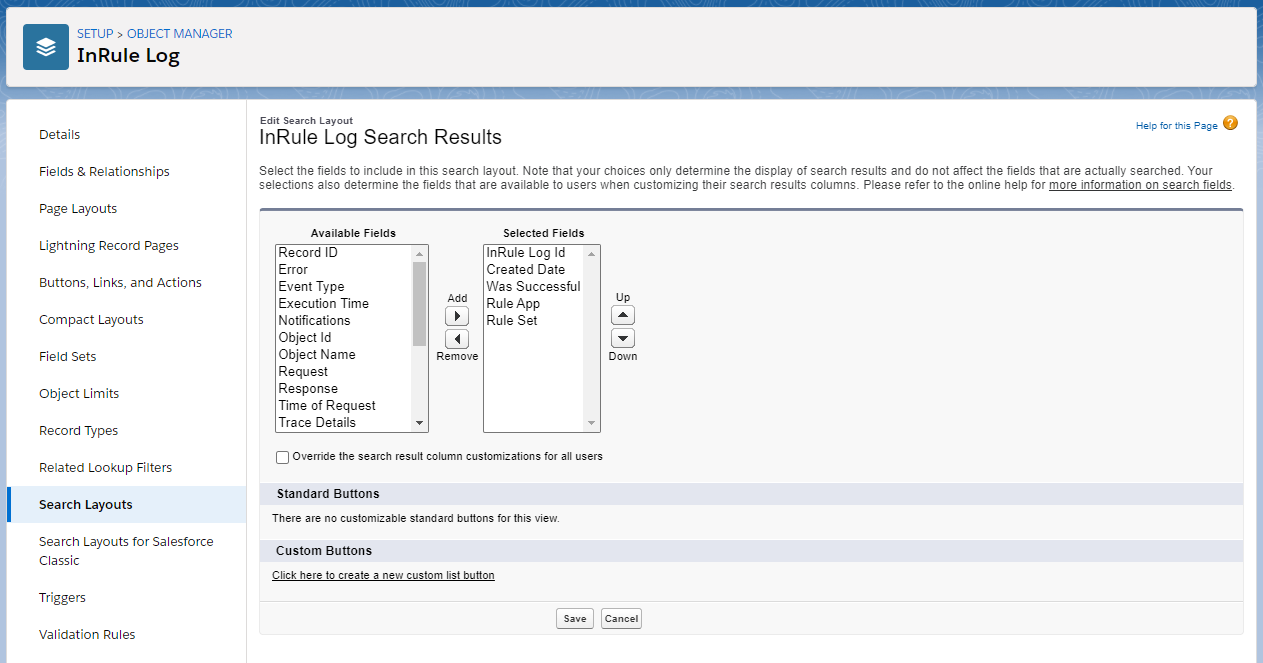
- Use the "Edit Search Layout" page to add and order fields for the InRule Log Search Layout. Once the changes to the Search Layout is saved, it will update the "Recently Viewed" list view. Below is the recommended configuration for the InRule Log Search Layout.
Named Credential Changes
Salesforce has revamped their Named Credential process – existing Named Credentials are now referred to as Legacy Named Credentials and will be discontinued at an unspecified date in the future. Starting with InRule version 5.8.1, we have added support for the new Named Credential process to the InRule managed package. We recommend following the configuration steps here and then deleting any InRule specific named credentials that existed prior to upgrading to version 5.8.1.
Important: Failure to remove the existing legacy credential will result in continued usage of that credential, regardless of whether you have configured the new credential included in the package upgrade.
Important: Failure to configure the new credential puts you at risk of a breaking change being introduced by Salesforce when they deprecate support for Legacy Named Credentials.
Deleting the InRule Package
In some situations, it may be necessary to delete the InRule package from your organization to resolve an issue. Before deleting the package, ensure you have backed up any config or log data you want saved. Then you will need to remove all references to the InRule package from any customizations you have made, including things like forms and flows. If you attempt to delete the package without removing these customizations, Salesforce will list any remaining dependencies you need to remove.