Accessing Salesforce Directly from Rule Helper
In the default Rule Execution setup, all relationships between Entity types must be established before these entities can be used by the rule app. This behavior is intuitive, but it is not ideal for all business problems. InRule for Salesforce provides a 'Rule Helper' assembly that can be used directly in a rule app and allows rules to load, compare, and assign data that is not related in Salesforce before rules are executed.
When to use the Query from Rules Approach
The query from rules approach adds value for the following business problems:
- The rules need to reference "lookup" information that may be in a list or set of Entities that are not specifically related to the current Entity hierarchy
- The purpose of rules is to create new relationships between Entity instances that already exist in Salesforce
- The rules need to compare many combinations of unrelated Salesforce Entities and produce results about best possible matches or scores
- A custom filter is required when loading data for 1:N relationships
Working with Disconnected Fields when Loading and Saving Data
One of the most important integration concepts when loading Salesforce data from rules is the notion of "Disconnected" Fields and Fields that have "Auto Load" and "Auto Save" disabled.
irX allows the rule author to explicitly control the "Auto Load" and "Auto Save" behaviors of Fields that are connected to Salesforce.
The example below shows a Collection named CandidateProducts. Since the Collection is not marked with a blue triangle, it is not considered to be attached to Salesforce.

Although Entity Fields and Collections may be "Disconnected" from Salesforce, the types contained by the Collections can be set to types that were imported from Salesforce.
If a Field is added to the schema using irAuthor, then it will be disconnected from Salesforce. If a Field has been imported from Salesforce using irX, then it can be disconnected from Salesforce by clicking the "Disconnect Item" button in the irX ribbon.

Two additional settings appear in the irX ribbon that offer additional control over automatic loading and saving behaviors for Fields that remain connected to Salesforce. In the example below, both buttons are "lit up", which denotes that the settings are enabled. By default, automatic loading and saving is enabled for all Fields that are connected to Salesforce.

Integrating the Rule Helper Component
InRule provides a sample rule application (SalesforceRules) that is already configured for RuleHelper usage. You can simply edit this rule app, or, if you wish to integrate the Rule Helper into an existing rule app, you can copy both the UDF Library "RuleHelper" and End Point 'SalesforceHelper' from the SalesforceRules rule to another rule application.
If you wish to manually create the UDF Library and End Point in irAuthor, follow the steps below.
- Create a new rule app using the irX add-in for irAuthor.
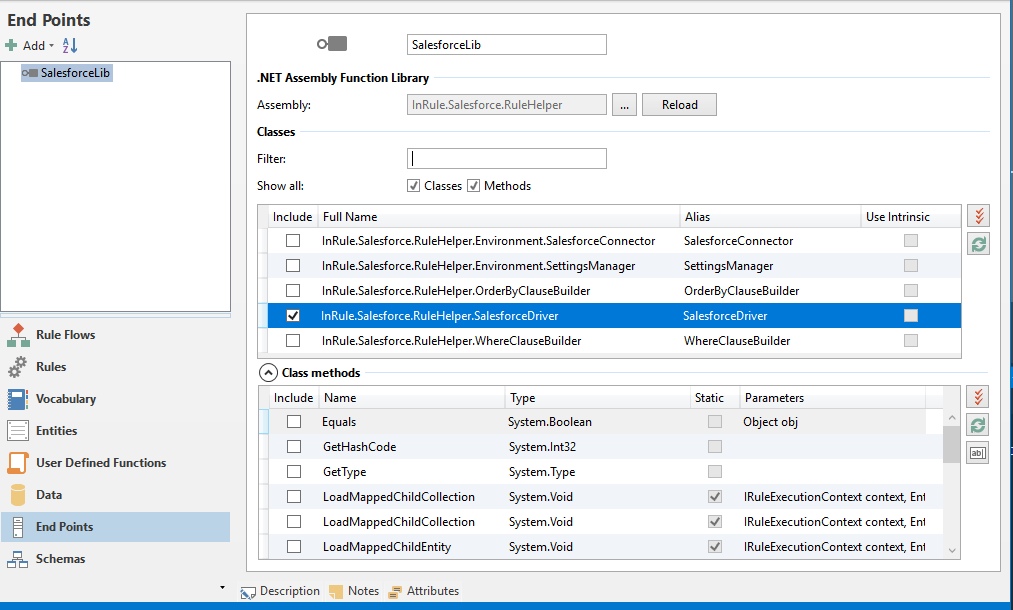
- Create a new ".NET Assembly Function Library" end point and bind the end point to the InRule.Salesforce.RuleHelper.dll assembly. Select the SalesforceDriver class and then select the methods that should be callable from rules. Edit the name of the end point to "SalesforceLib" or similar. Select the methods from the SalesforceDriver that are needed for the Rule Application. You do not need to select all the methods—only import the methods that will actually be used by rules. Additional methods can always be imported later be revisiting the endpoint screen and reloading the assembly.
- Add a User Defined Function library and set the name to "SalesforceHelpers" or similar. This library will contain functions that the rules will call to query Salesforce.
- Add a User Defined Function to the new library. The example below shows a UDF that will be used to execute the QueryCollection method on the SalesforceDriver. Fill out the UDF with script that will call a method on the SalesforceDriver.
The methods on the SalesforceDriver are designed to be reused for more than one Entity type, Field, or set of Fields. The name of the Target Field or Collection should be supplied as a string. When querying a Collection of results, an optional "where" clause can be provided that will be forwarded to calls against the Salesforce SDK. In addition, an "order by" clause can be provided to return sorted results.
This integration pattern relies on the "Context" object that is available from irScript. The Context object returns information based on the context under which a given UDF is executed. For example, when executing an Entity Rule Set, the Context.Entity returns a reference to the Entity against which the current Rule Set is executing. The Context and its child properties are passed to the SalesforceDriver so it has enough information to form calls to Salesforce and map responses back to the InRule Rule Session.
The Context.FunctionLibraries property can be used to create calls to the .NET assembly library methods, such as the methods imported in Step 5 above. The following script example demonstrates how to use the Context object in irScript to form a call to a static .NET method:
Context.FunctionLibraries.SalesforceDriver.QueryCollection(Context, Context.Entity, collectionName, filter, orderBy, connectionString);
- Rules can now be authored to execute methods on the SalesforceDriver. These methods can be used to load Collections, single Entities, or single Fields from Salesforce based on conditional logic within rules.

The Target Collection in the sample rule is called "FamilyMembers". This is a Field that either does not exist in Salesforce (only for use in rules), or has been imported and then "disconnected" from Salesforce using the "Disconnect Field" button, or has "Auto Load" disabled.
Please see the following sections for more details on the creating the "filter" clauses similar to the one used this example.
Filtering Queries using the Where Clause Builder
When loading data from Salesforce during rule execution, it is critical that the rule author is able to author logic to specify which Entity data to load. Using the RuleHelper, this is accomplished by allowing the rule author to pass in a "filter" or "where" clause into the calls against the SalesforceDriver class.
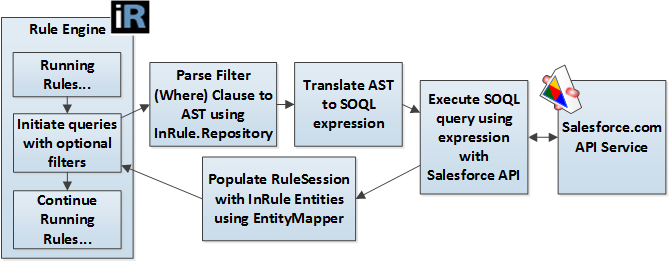
During execution of the SalesforceDriver, the filter clause is parsed into an Abstract Syntax Tree (AST) and then translated into SOQL (Salesforce Object Query Language) so it can be executed against the Salesforce data. The filter clause is based on the InRule function syntax format.
The InRule function syntax format is used for the following reasons:
- The syntax rule format is consistent with the rule authoring experience used throughout irAuthor
- This format can make good use of the InRule AST parser that is included as part of irSDK
The diagram below depicts the logical flow of steps used by the SalesforceDriver and WhereClause builder classes to query data from rules.
The diagram and notes below contain some additional information about forming the filter clause in a rule:
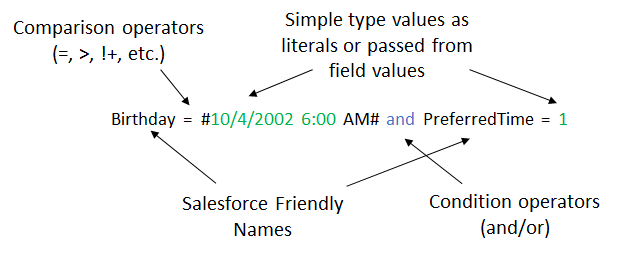
- All the Field names that are used are the Salesforce friendly names (Salesforce Field Label) that are used in the Rule Application. These names are mapped back to the Salesforce Field names in the parser.
- String literals should be wrapped in single quotes, date literals should be wrapped in pound signs.
- Simple operators are supported to compare values, such as =, !=, >, < (ex. Age > 21, Name != 'Ralph').
- Multiple conditions can be chained together using 'and' and 'or' keywords.
- The following keywords and operators are supported by the InRule AST parser and expression tree translation code: =, <>, !=, +, -, *, /, or, and, xor, >, >=, <, <=, ^,
The filter expression also supports querying against related entities, simply by appending the related entity name in front of the relevant query field. Querying against related entities requires that all entities and fields queried in the relationship chain be imported into irAuthor.

In this example, we are populating a collection by querying the Contact entity, which is the "parent" entity here. We are then applying a filter statement to return only contacts with related Cases that have a Web Name of "Rogers." Cases in this example is the "child" entity. Notice how the hierarchy of the related entity down to field is denoted. If you wanted to drill down another layer to a "grandchild" entity (in this example, an entity related to Case), it would be accomplished by simply continuing the chain from entity to field. Below is an example of a "grandchild" case:

This example would return Accounts that have related Contacts with Cases that have a Web Name of "Rogers." The filter expression can support querying in this manner up to 5 "layers" deep, not including the initially queried entity. Put another way, you can have up to 6 total different related entities in a single filter expression.
The filter expression supports querying against multiple properties from different related entities. In the below example, we are querying for Contacts with Cases that have Descriptions starting with "A" and also have Leads with Names starting with "A."

Ordering Query Results with the OrderByClauseBuilder
The SalesforceDriver class also supports the ability to control the order of the results returned from Salesforce by passing in an optional "order by" clause. The order by clause can accept only a single Field name, which should be the name of the Field in the Rule Application. The results are always sorted in ascending order unless the Field name is followed by the "desc" syntax. Please see the examples below:
To sort ascending, pass the Field name to use in the sort:

To sort descending, pass the Field name to use in the sort followed by the "desc" keyword:

The "order by" clauses generally contain much simpler expressions than "where" clauses. However, InRule syntax rules format is used for the order by clause to be consistent with the where clause approach.
Methods Available in the Rule Helper
The following table lists the public, static methods that are available in the SalesforceDriver
| Method Name | Description |
|---|---|
LoadMappedChildCollection | Populates a child Entity Collection based on an existing 1:N relationship in Salesforce. The Collection is populated based on existing parent-child relationship data in Salesforce. |
LoadMappedChildEntity | Populates a child Entity Field based on an existing 1:1 relationship in Salesforce. The Field is populated based on existing parent-child relationship data in Salesforce. |
QueryCollection | Populates an Entity Collection with a set of a given Entity type. An optional filter clause (where clause) can be used to define selection criteria for the Entity set. The Collection does not need to correspond to a 1:N relationship in Salesforce. |
QueryEntity | Populates an Entity Field or variable based on a query to Salesforce. An optional filter clause (where clause) can be used to define selection criteria for the Entity. The Field does not need to correspond to a 1:1 relationship in Salesforce. If more than one Entity is returned from the query to Salesforce, then the first Entity in the set is used. |
QueryField | Populates a primitive Field or variable based on a query to Salesforce. An optional filter clause (where clause) can be used to define selection criteria for the Entity. If more than one Entity is returned from the query to Salesforce, then the Field value from the first Entity in the matching set is used. |
Additional Flags Available to Control Loading and Caching Behaviors in the Rule Helper
During a given query operation, there may be advanced use cases that require specific control over loading or reloading data from Salesforce. The optional overloads of the QueryEntity and QueryCollection methods expose a set of optional Boolean flags that help control caching and depth of loading behaviors. The table below list these parameters:
| Parameter Name | Description |
|---|---|
loadChildren | Denotes if the execution service should recurse the Entity graph and load all children. If false, no children are loaded below the Collection Members that are loaded. The default value is true. |
useCaching | Denotes if previously loaded Salesforce Entities should be reused from the InRule entity cache, or if new entity instances should be created. If false, the original entity data will be requested from Salesforce, and a copy of the Entity is created. The Instance ID is not set to the ID of the Salesforce Entity, which will also prevent changes to this entity from being written back to Salesforce. This functionality can, for example, be used to load the original values for an entity persisted in Salesforce when rules are run on update and compare the original and updated values. The default value is true. |
overwriteIfLoaded | Denotes if a previously loaded Salesforce Entity should be repopulated with the latest values in Salesforce. This behavior will overwrite Field values stored in the cache. The default value is false. |
cacheInAppDomain | Denotes if the result of the query should be saved in the persistent AppDomain cache. The difference between this parameter and the 'useCaching' parameter above is that enabling this parameter will save the query result in a cache that will persist across multiple different rule executions, where the above parameter only enables caching within the scope of a single rule execution. |
The default values should always be used for the cache settings unless there is a specific use case that requires different behaviors.
Using the Rule Helper with the Native REST Execution Service
While using the Salesforce rule execution service documented in this guide is the suggested way to interact with Salesforce via rules, you can also use the rule helper from the native REST execution service, which does not connect to Salesforce out of the box.
To do this, you will first need to copy the Salesforce rule helper assemblies to the bin directory of your execution service. These assemblies can be found in the `RuleHelperDeployment` folder of the framework zip you download from the support site. The method for copying these assemblies will differ based on your exact hosting setup, but if your execution service is hosted in Azure you can copy these files over via the App Service Editor or FTP.
Once you have copied the assemblies to the bin directory, you will need to add the required app settings for authenticating to Salesforce. These are the same parameters provided in the Update parameters step of the template deployment, but you will need to provide the exact app setting names instead of the template parameter names. These are the settings you will need to provide, along with their mapping to the template parameters from the section linked above:
| App Setting Name | Template Parameter Name |
|---|---|
| Inrule:sf:api:loginUrl | sfLoginUrl |
| inrule:sf:api:username | sfUsername |
| inrule:sf:api:password | sfPassword |
| inrule:sf:api:securityToken | sfSecurityToken |
| inrule:sf:api:consumerKey | sfConsumerKey |
| inrule:sf:api:consumerSecret | sfConsumerSecret |
Once you have set these app settings, you should be able to use the rule helper to manually load and save data to Salesforce from rules, just like you would from the Salesforce rule execution service.