Executing Rules from Salesforce Flow
If you need to integrate rules with more complex process automation, rules can also be run from Salesforce Flow. The InRule integration with Flow lets you run rules against a particular entity record, and receive back the status and notifications from rule execution.
There are currently 5 types of Flows in Salesforce:
- Screen Flow - With Screen Flow you can create a custom UI (user interface) and guide users through a business process that can be launched from Lightning Pages, Experience Cloud (previously known as Community Cloud), quick actions and more.
- Record-Trigger Flow - Record-Triggered Flow launches when a record is created, updated, or deleted. So far, we have used Apex triggers for this automation, some of which can now be done using Flows. Since the integration makes a callout to an external service it will need to be invoked on the 'Run Asynchronously' path
- Schedule-Triggered Flow - This flow launches at the specified time and frequency for each record in a batch. Traditionally, we have met this kind of requirement by using Apex batch jobs.
- Please note that a schedule-triggered flow can make callouts only after executing a Wait element. For more information please visit the Salesforce Schedule-Triggered Flow Considerations documentation.
- Platform Event Flow - Platform event flow Launches when a platform event message is received. For example, you can pump the data from an external system in Platform Events and then use Flows to split and save the records in different objects.
- Autolaunched Flow - Auto Launches flow launch when invoked by Apex, Process Builder or even REST API.
For more information about these Flows, you can visit the Introduction to Salesforce Flows.
To run rules from a flow, you will need to add an 'Action' element to your flow. You can find the InRule action by searching for 'Run Rules' in the search box. The display name will be 'Run Rules' and the ID will be apex-inrule__DecisionClient

When adding the action, you will need to fill in the following required parameters
| Parameter Name | Description |
|---|---|
| Entity ID (String) | The unique Salesforce identifier for the root object in the request. If running a flow from an object page, you can configure this value to be passed in to an input variable |
| Object Type (String) | The Salesforce object type of the root object in the request. For example, if running rules against an Account entity, this will need to be set to a string value of "Account". |
| Persist Changes (Boolean) | Enable or disable saving changes made to entities during rule execution |
| Rule App Label (String) | Set to use a specific catalog version label when executing rules, otherwise leave blank to always use the latest version of the Rule App |
| Rule App Name (String) | The name of the InRule Rule App that contains the rule set to run |
| Rule Set Name (String) | The name of an explicit Rule Set to call as the entry point for rule execution. |
| Use Entity Prefix (Boolean) | Typically set to false. If set to true, the DecisionClient will append the entity label to the supplied rule set name. For example, if you pass in a ruleSetName of "DefaultRules" and set useEntityPrefix to true, the effective ruleSetName name would be "AccountDefaultRules" |
This action has three outputs
| Output Name | Description |
|---|---|
| Notifications (Apex-Defined collection) | Includes notifications fired from rules during execution. This output can be assigned to a resource variable of the same type for use in subsequent steps. The Apex class for this collection is 'inrule__NotificationMessage'. This class has the following properties: - Type: integer value representing notification type. 0 for Info, 1 for Warning, and 2 for Error - Message: string value containing the notification text |
| Errors (Apex-Defined collection) | Includes any errors that prevent rule execution from completing. This output can be assigned to a resource variable of the same type for use in subsequent steps. The Apex class for this collection is 'inrule__NotificationMessage'. This class has the following properties: - Message: string value containing text of the error - Source: string value containing the error source |
| Is Success (Boolean) | If rules are not able to be executed for any reason, this value will be set to true. If true, additional error information will be available in the 'Errors' output collection |
The following is an example of what a Flow using rules might look like. You can do other things with the output from the Apex action, but this demonstrates a common use case, displaying rule notifications to the user. The flow starts with Apex action, assigns the output collections to variables, loops over the notifications to build a single string containing all notifications, and then outputs the value to the screen
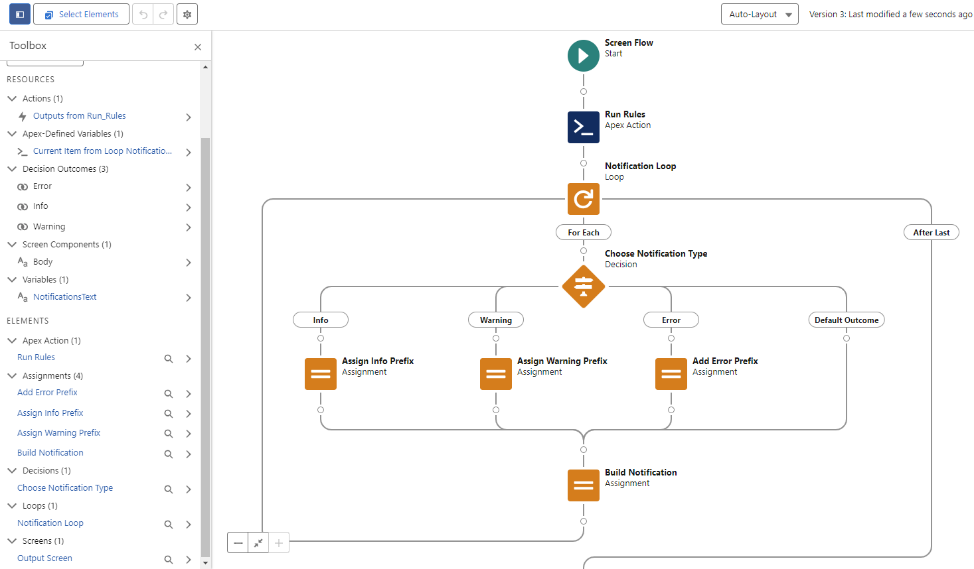
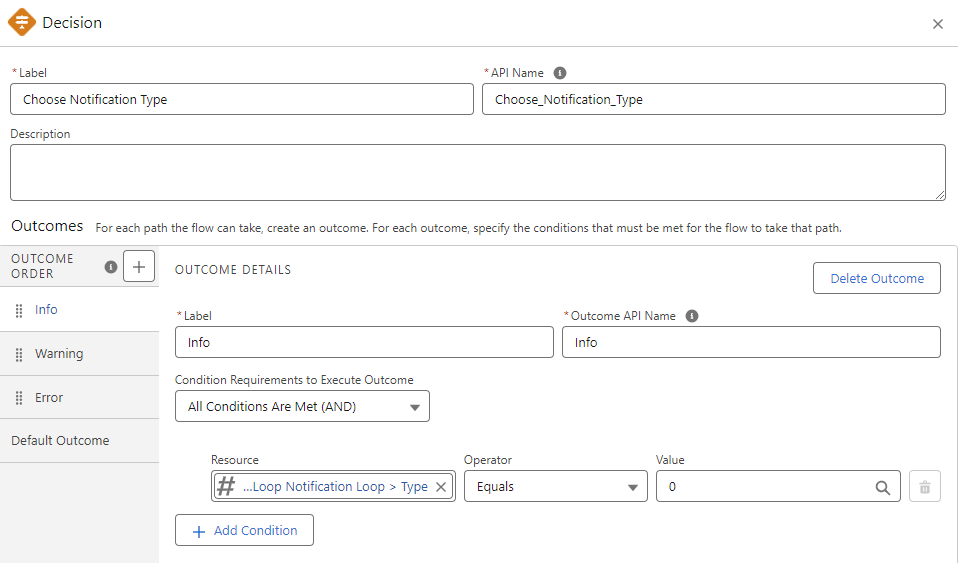
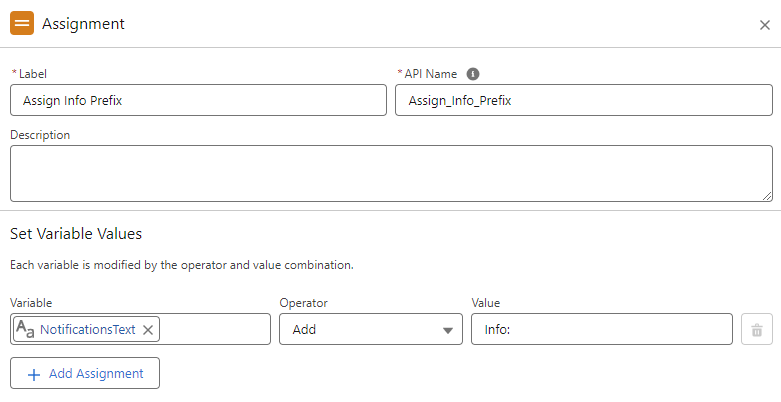
When looping through the notifications, a decision checks the notification type integer to determine what text to prefix the message with.
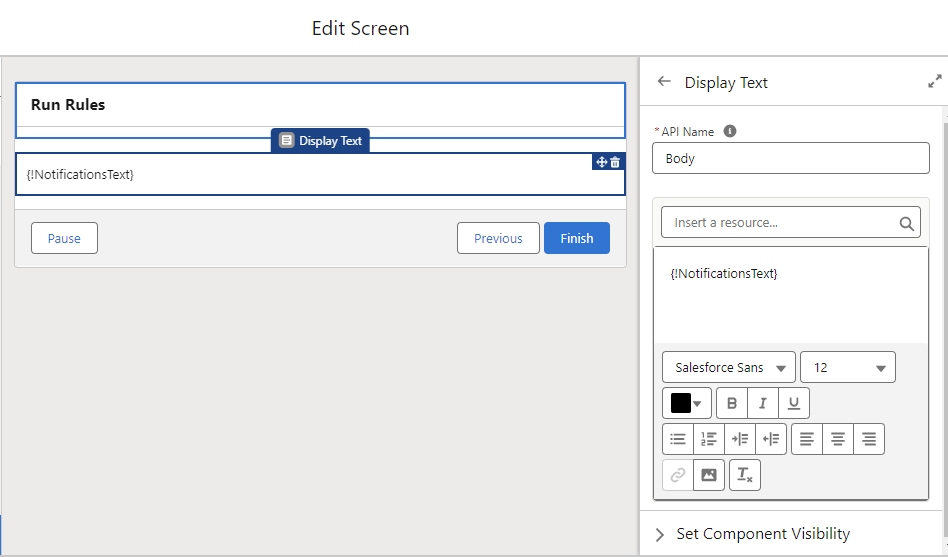
The combined notification text value is then displayed on the screen