Deployment Prerequisites
This section reviews what you will want to have prepared before you begin with the integration steps in the next section.
Optional Resource Files
The following file can be downloaded from our support website's downloads section:
- InRule for Salesforce.zip
This zip file contains several resources that can be used in advanced deployments. A typical installation does not require the use of these resources, as all the required deployment assets are available online. However, this zip file provides an alternative means of accessing the InRule for Salesforce assets.
After you have downloaded this file, but before extracting, make sure that you go to the file properties for the zip and select Unblock. If the zip file is not unblocked before extracting, the deployment scripts will not be able to execute successfully.

After unblocking the zip file, extract the contents to a working folder. When you are finished, you should have a directory structure that looks like this:
InRule for Salesforce.zip

└──InRule for Salesforce
    │ readme.txt
    │
    ├──RuleApplications
    │     SalesforceRules.ruleappx
    │
    ├──RuleExecutionAzureService
    │     azuredeploy.json
    │     azuredeploy.parameters.json
    │     InRule.Salesforce.WebService.zip
    │
    └──RuleHelperDeployment
          InRule.Salesforce.RuleHelper.dll
          ...(many other supporting files)
Rule Authoring Environment
A rule authoring environment is used to upload a Rule Application to your Catalog Service. A rule authoring environment is a machine or virtual machine where irAuthor has been installed with the irX for Salesforce extension. If you followed the instructions outlined in irX for Salesforce Help Documentation, then you should already have a rule authoring environment available to you.
We have made it a point to call out the rule authoring environment separately because it is important to be aware of the licensing implications of this step. You will need to utilize an irAuthor license and an irX for Salesforce license to activate the related components in the authoring environment. If you are a system administrator who does not intend to perform rule authoring activities after the deployment is up and running, you can either chose to borrow an environment from someone who will use a rule authoring environment, or you will want to be sure to deactivate your license when you're finished with your deployment responsibilities.
Administrative Accounts
Salesforce Service Account
You will need an existing or new Salesforce account to use as a service account to connect to the Salesforce API. This account will be used by the rule execution service to load and save data from Salesforce required by rules. This account does not need to be a System Administrator account, but it will need permissions to use the Salesforce API and interact with entities used by rules.
Security Token
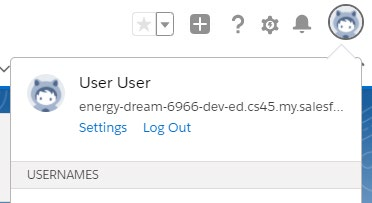
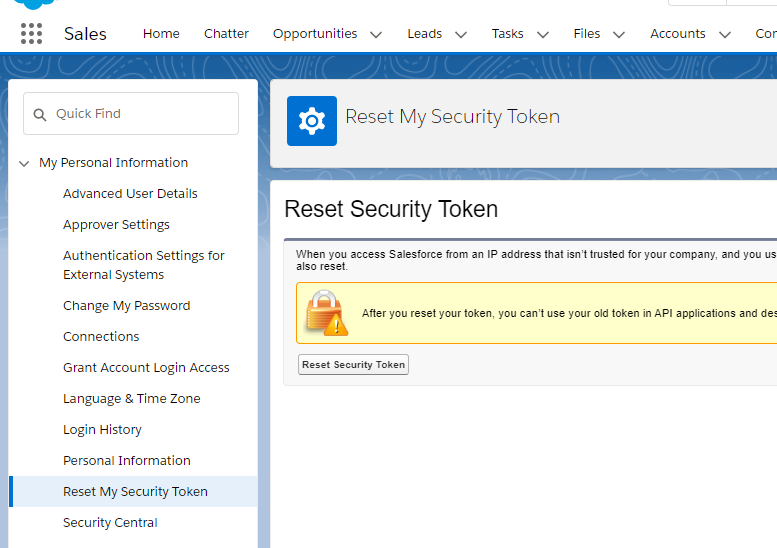
If the account does not already have an API token, then log into the Salesforce portal and go to the user Settings from the avatar menu in the top-right. On the sidebar that appears, navigate to My Personal Information → Reset My Security Token. On the page that appears, click the 'Reset Security Token', and you should receive an email within a few minutes that contains an API token.
Security tokens are, in most scenarios, required. They are only optional in scenarios when the account attempting to authenticate is connecting from a Trusted IP address. Trusted IPs can be set globally, meaning any user that connects from an IP in the trusted range will be regarded as trusted, or on the Profile level, meaning that only users assigned to the given Profile will be regarded as trusted when connecting from an IP that falls in the trusted range. But regardless of how Trusted IPs are configured, if the account in question does not fall in a configured Trusted IP range, it must have a security token set.
If trusted IP ranges are enabled for this account, you will not see the 'Reset My Security Token' button. If this is the case, simply leave this value blank where required later.
Other Credentials
Administrative Password to use for Catalog Service: You should decide what username and password you want to use for administrative privileges within irCatalog. You will use this password when following the referenced catalog setup guide and will need to provide it when deploying the Execution Service.
** This walkthrough utilizes the default login of admin and password of password. It will be up to the reader to go through the process of utilizing the Catalog Manager to change these credentials to be more secure.
API Key for the Rule Service: The rule execution service is protected using an API key. For SaaS deployments, your API key can be found in the InRule Portal by navigating to "Provisioned Resources" and finding the "Execution" resource. For Self-hosted deployments, you can generate your own key, but it is important to save this key as it will be used when configuring Salesforce later.
Administrative Password to use for SQL Server: You should decide what username and password you want to use for administrative privileges on the SQL Server. You will use this password when following the referenced catalog setup guide.
** This walkthrough will utilize the above administrative login and password for the Catalog Service to connect to the SQL Server Database. In a more secure environment, a separate SQL User should be created that only has access to the single database needed by the catalog. It is up to the reader of this document to go this more secure route.
Administrative Login and Password for Microsoft Azure: You must have a username and password that will be used to perform administrative tasks within Microsoft Azure.
InRule Azure License File
You will need a special .xml file used for licensing InRule in an Azure cloud environment. This may have been provided with your InRule Welcome package. You can contact support@InRule.com if you have questions about where to get your license file.
Deciding resource names
The following worksheet can be used to decide what to name Azure resources as you go through this Guide.
Many of these resources must have names that are unique in the world; they are hosted on Microsoft Azure and are given domain names that match. We recommend creating a "Base" name that does not exceed 14 characters. We recommend encoding an organization name, an application name, and an environment name into this 'Base' name. For Example:
{ApplicationAbbreviation}{OrganizationAbreviation}{EnvironmentAbreviation}
MyAppInRuleDev 12345678901234
You can choose to follow this convention or invent your own.
| Resource and Description | Example Name |
|---|---|
| Base Name | MyAppInRuleDev |
| Azure Resource Group Name | MyAppInRuleDevResourceGroup |
| Azure SQL Server Name must be lower case | myappinruledevsqlserver |
| Catalog Database Name | MyAppInRuleDevCatalogDb |
| Catalog App Service Name | MyAppInRuleDevCatalogService |
| Rule Execution App Service Plan Name | MyAppInRuleDevRuleExecutionAppServicePlan |
| Rule Execution App Service Name | MyAppInRuleDevRuleExecutionAppService |
Enabling OAuth Username-Password Flow
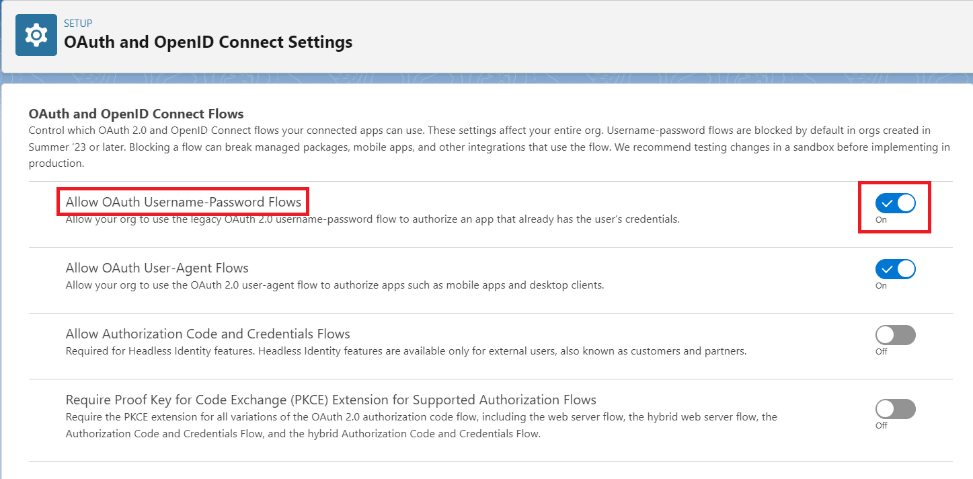
Starting with the Summer '23 Salesforce update, new Salesforce instances now have the Allow OAuth Username-Password Flows setting disabled. In order for InRule to authenticate back to Salesforce, you will need to verify that this setting is enabled.
To begin, navigate to the OAuth and OpenID Connect Settings page by using the quick find search box. Once there, find the Allow OAuth Username-Password Flows toggle and enable it.
Deploying and Configuring Components
There are two primary paths for deploying the required InRule components:
-
App Stores: Azure Marketplace and Salesforce AppExchange - (Recommended) Provides a straightforward, UI-driven process that simplifies deployment and eliminates the need to individually deploy both the Catalog App Service and the Rule Execution App Service. Both the Azure Marketplace (for InRule App Services) and the Salesforce AppExchange (for the InRule for Salesforce App) must be utilized to deploy their respective InRule Apps (see matrix below).
-
Manual Deployment using ARM Templates and Scripts: Manually deploy Azure Resource Management (ARM) Templates through either the Azure Portal, Powershell, or Azure CLI; then deploy the InRule for Salesforce App via a versioned package link to your Salesforce environment.
InRule components by deployment path:
| InRule Component | App Stores | Manual Deployment |
|---|---|---|
| Catalog App Service | Azure Marketplace | ARM Template |
| Rule Execution App Service for Salesforce | Azure Marketplace | ARM Template |
| InRule for Salesforce App | Salesforce AppExchange | Versioned Package Link |