How Dynamics 365 Data Types Are Mapped
irAuthor supports basic data types such as string, integer, decimal etc. It also supports the ability to relate Entities with one-to-many and one-to-one relationships. This article discusses how the various Microsoft Dynamics 365 field data types and relationship types are handled in irAuthor.
Field Data Types
| Microsoft Dynamics 365 Friendly Data Type Name | Microsoft Dynamics 365 System Data Type Name | How it's handled in irAuthor |
|---|---|---|
| Single Line of Text | String | Creates a String field |
| Multiple Lines of Text | Memo | Creates a String field |
| Whole Number | Integer | Creates an Integer field |
| Floating Point Number | Double | Creates a Decimal field |
| Decimal Number | Decimal | Creates a Decimal field |
| Currency | Money | Creates a Decimal field |
| Date and Time | DateTime | Creates a DateTime field |
| Two Options | Boolean | Creates a Boolean field |
| Option Set | Picklist | Creates an Integer field and also links the field to a value list that contains both the values and descriptions for each value |
| Status | State | Creates an Integer field and also links the field to a value list that contains both the values and descriptions for each value |
| Status Reason | Status | Creates an Integer field and also links the field to a value list that contains both the values and descriptions for each value. Note: Since Status Reason is dependent on the Status, the display name in the value list is a composite of Status and Status Reason (e.g. Open: Pending) |
| Primary Key | Uniqueidentifier | Creates a String field which will store a textual representation of the Global Unique Identifier (GUID). E.g. 21EC2020-3AEA-1069-A2DD-08002B30309D |
| Customer | Customer | The Customer type in Microsoft Dynamics 365 allows for an Entity to link to either an Account or a Contact. Unfortunately, you will not know which one until the rules are running against a specific record. Since irAuthor requires that only one target Entity can be specified, a linking Entity called Customer Lookup is created. The Customer Lookup Entity in irAuthor has three fields: a link to Account, a link to Contact and a Customer Type field that specifies whether Account or Contact is used. This allows you to write rules to say If Customer Type = Contact, then... or If Customer Type = Account, then... If you select a field of type Customer, the Account and Contact Entities will be automatically selected and pulled into irAuthor. |
| Multi-Select Option Set | Multi-Select Option Set | Creates a Complex Collection that contains Integer fields that link the fields to value lists that contain both the value and description for each value. |
Lookup Fields and Children (one-to-many relationships)
| Microsoft Dynamics 365 Relationship Type | Name Used in Configuration Screen | How it's handled in irAuthor |
|---|---|---|
| Single Entity Lookup (field) | Lookup | The target Entity is created in irAuthor and a field linking the two Entities is created on the source Entity. |
| 1:N Relationship | Children | One-to-many relationships are represented under the heading Children in the Configuration wizard. When you select a child Entity, the Name field of the target Entity type is automatically selected. During import both the parent and child Entities are created in irAuthor and linked through a collection on the parent. Rules written at the Parent context can be used to perform aggregation (sum, min, max, average, etc.) to retrieve data from a specific collection member or to execute rules against one or more of the collection members. |
| Customer (field) | Customer | The Customer type in Microsoft Dynamics 365 allows for an Entity to link to either an Account or a Contact. Unfortunately, you will not know which one until the rules are running against a specific record. Since irAuthor requires that only one target Entity can be specified, a linking Entity called Customer Lookup is created. The Customer Lookup Entity in irAuthor has three fields: a link to Account, a link to Contact and a Customer Type field that specifies whether Account or Contact is used. This allows you to write rules to say If Customer Type = Contact, then... or If Customer Type = Account, then... If you select a field of type Customer, the Account and Contact Entities will be automatically selected and pulled into irAuthor. |
| Owner (field) | Owner | The Owner type in Microsoft Dynamics 365 allows for an Entity to link to either a User or a Team. Unfortunately, you will not know which one until the rules are running against a specific record. Since irAuthor requires that only one target Entity can be specified, a linking Entity called Owner Lookup is created. The Owner Lookup Entity in irAuthor has three fields: a link to User, a link to Team and an Owner Type field that specifies whether User or Team is used. This allows you to write rules to say If Owner Type = User, then... or If Owner Type = Team, then... If you select a field of type Owner, the User and Team Entities will be automatically selected and pulled into irAuthor. |
| Multiple Entity Lookup (field, e.g. Regarding) | Lookup | There are certain types of Lookups in Microsoft Dynamics 365 that allow for an Entity to connect to any number of possible Entity types. The most common example is the Regarding field on an activity: An email could be linked to an Account, a Lead, a custom Entity, etc. Unfortunately, you will not know which Entity type it is until the rules are running against a specific record. This type of Lookup is handled in irAuthor through an Entity Lookup Entity. The Entity Lookup contains the Name of the related Entity and it's ID. |
irAuthor Entity and Field Display
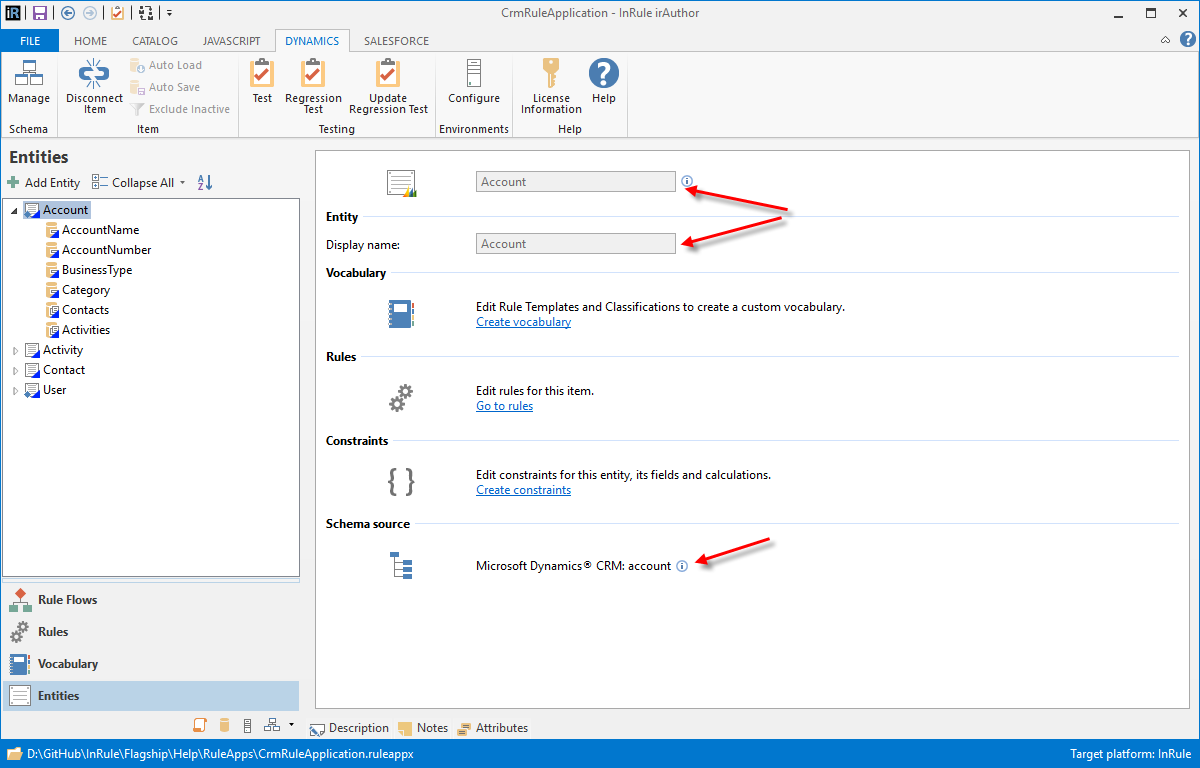
When irAuthor displays an Entity that was imported from Microsoft Dynamics 365, its icon and the "Schema Source" section of the Entity display indicate that the Entity came from Microsoft Dynamics 365. You cannot change the name or description of an imported Entity.
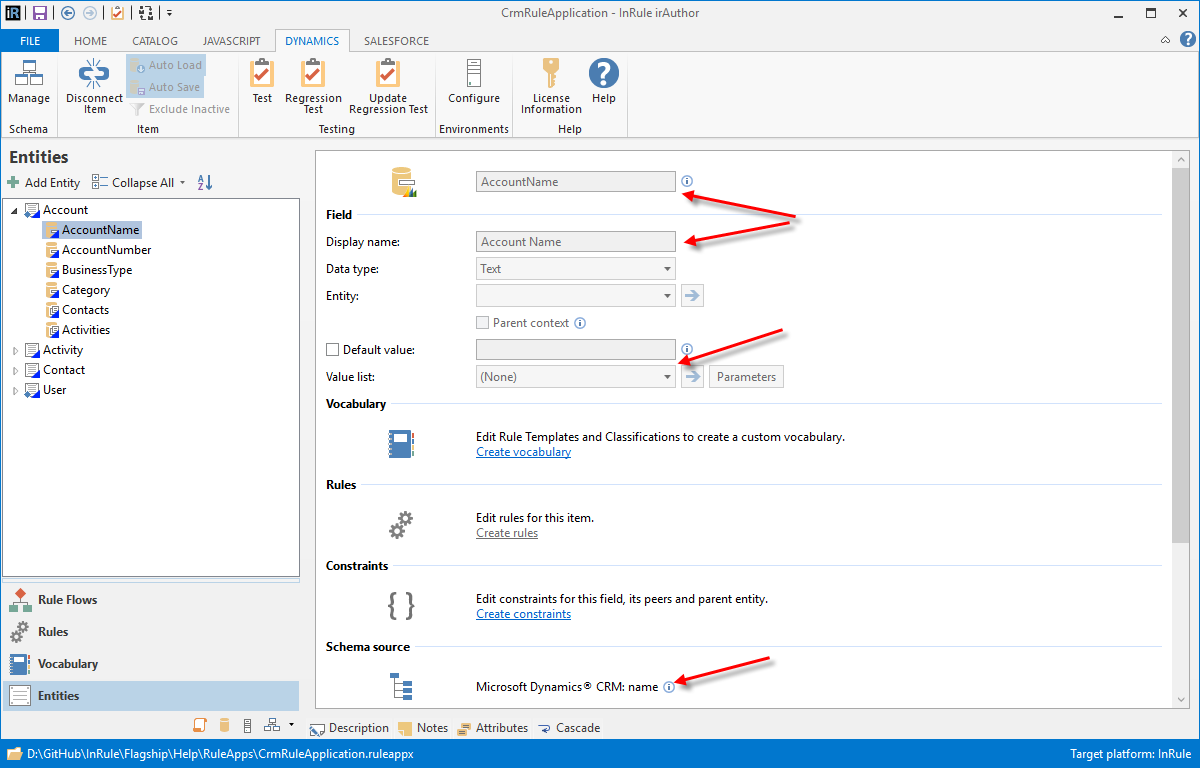
Similarly, when irAuthor displays a Field that was imported from Microsoft Dynamics 365, its icon and the "Schema Source" section indicate that the Field came from Microsoft Dynamics 365, and you cannot change the Field's name or description. In addition, you cannot specify a value list.