Actions in irAuthor Web
Actions are the tasks the engine executes if the conditions of a rule evaluate to TRUE. Rules can also contain only actions if required.
The following sections cover the various actions available in irAuthor Web.
Core actions
Set Value
The Set Value action assigns a value to a field or variable.
Name
Specifies the name of the action.
Enabled
Controls whether the action executes.
Description
Editable description of the action.
Target
Specifies the field or variable to set.
Value
Specifies the expression used to calculate the value.
Declare Variable
Defines a variable scoped to the rule set.
Name
Specifies the variable name.
Enabled
Controls whether the action executes.
Description
Editable description of the action.
Data type
Specifies the type of the variable.
Entity
Required when data type is Entity.
Default value
Optional initial value.
Fire Notification
Creates a runtime notification.
Name
Specifies the notification name.
Enabled
Controls whether the action executes.
Description
Editable description.
Message
Notification message.
Notification Level
Specifies severity.
Associated field
Optional linked field.
Allow Multiple Notifications
Controls whether multiple notifications can be generated.
Rule execution actions
Execute rule set
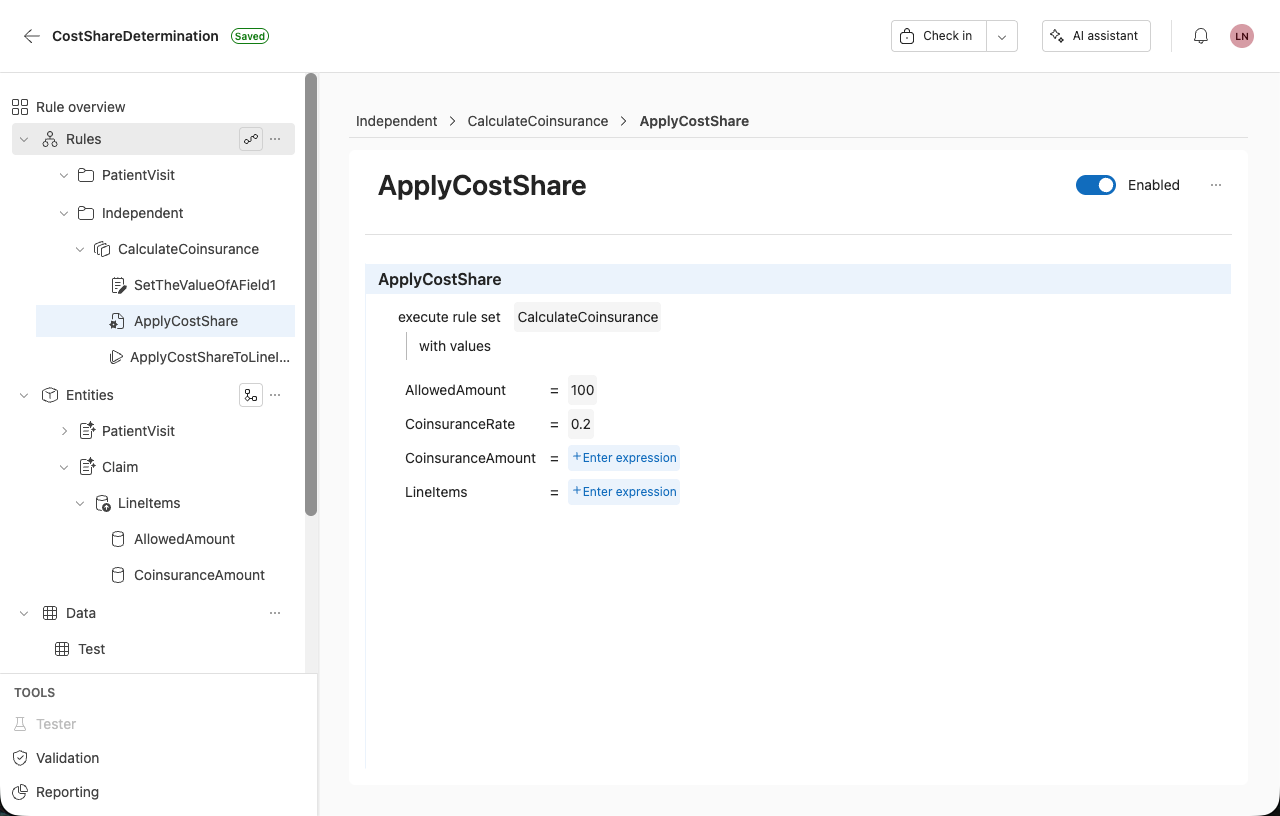
You can configure a rule to execute an independent rule set.
When adding this action, the rule includes editable fields such as:
- Execute rule set
- + Enter rule set
If the selected rule set defines values, you can assign those when configuring the action.
These values are used when the rule set is executed.
Execute member ruleset
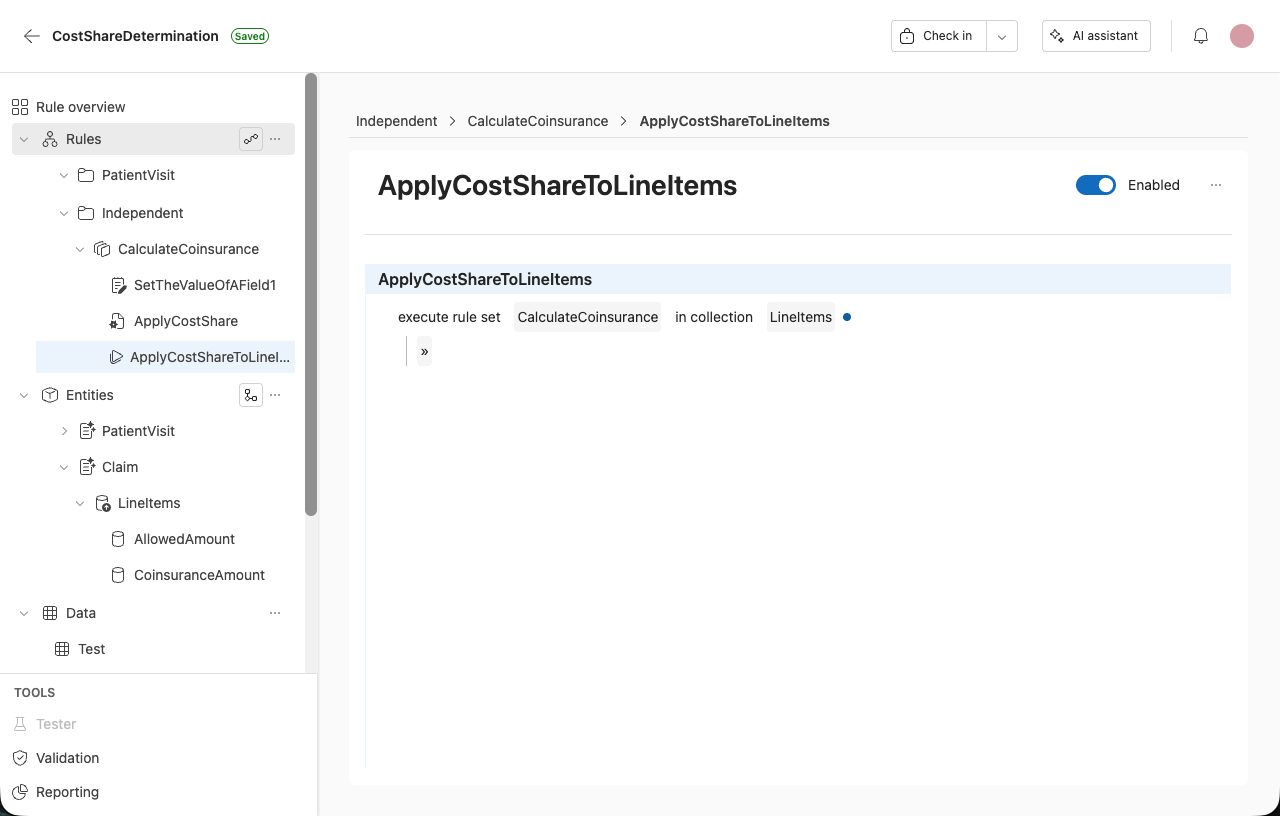
You can execute a rule set across a collection.
When using this action, the rule template includes the fields:
- Execute rule set
- + Enter rule set
- In collection
- + Collection
You can also enable or disable the action using the toggle.
Execute SQL Query
Runs a SQL Query data element defined in the rule application, with optional input parameters, and assigns the result to a target field.
The SQL Query must already exist before you can add this action. Create it first in the Data section. See Create a SQL query.
SQL queries in irAuthor Web currently run only against inline-table sources. A direct database connection is not supported yet.
- Open a rule set and select + Add rule.
- Select execute sql query from the action list.
- Select + Select sql query and choose the SQL Query to run.
- Under with arguments, the query's defined parameters appear in a grid (Name, Direction, Type, Expression). Select + expression on a parameter to map it, for example to a field like
Member.MemberId. - Select + result target next to store result in to choose the field that receives the query's result.
- Select + return first row only to use only the first row when the query returns more than one.
- When the result target is a field, a + value column option also appears, to choose which column to use if the query returns more than one column.
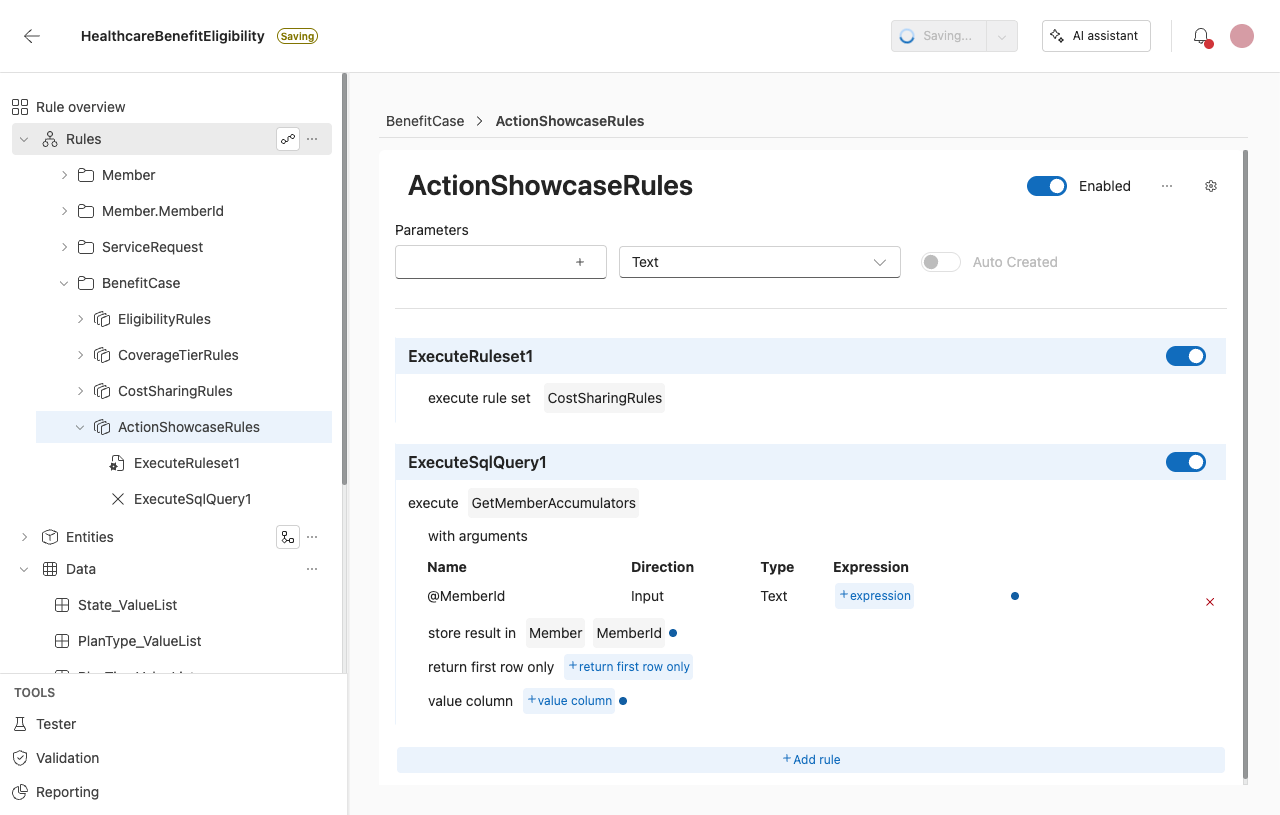
Field pickers for parameters and the result target require the full dotted path to the field (for example, Member.MemberId). Entering only the last segment (MemberId) does not resolve.
Execute decision
Executes a decision defined in the rule application.
Name
Specifies the name of the action.
Decision
Specifies the decision to execute.
Inputs
Optional input values for the decision.
Collection actions
Add Collection Member
Adds a new member to a collection.
Name
Specifies the name of the action.
Enabled
Controls whether the action executes.
Description
Editable description.
Collection Name
Target collection.
Initial Field Values
Optional initial values.
Copy Mode
By reference, shallow, or deep copy.
Remove Collection Member
Removes a member from a collection.
Name
Specifies the name of the action.
Enabled
Controls whether the action executes.
Description
Editable description.
Collection
Target collection.
Remove index
Index or expression.
Clear Collection
Removes all members from a collection.
Name
Specifies the name of the action.
Collection
Target collection.
Sort Collection
Sorts a collection.
Name
Specifies the name of the action.
Enabled
Controls whether the action executes.
Description
Editable description.
Collection
Collection to sort.
Sort fields
Fields and direction.
Copy collection
Copies members between collections.
Name
Specifies the name of the action.
From
Source collection.
To
Target collection.
Copy mode
By reference, shallow, deep.
Filter
Optional filter.
Entity actions
Copy entity
Copies one entity to another.
Name
Specifies the name of the action.
From
Source entity.
To
Target entity.
Copy mode
By reference, shallow, deep.
Data mapping actions
Map JSON document to fields
Maps JSON data into fields.
Name
Specifies the name of the action.
Source
JSON expression.
Target
Target field or entity.
Map XML to fields
Maps XML data into fields.
Name
Specifies the name of the action.
Source
XML expression.
Target
Target field or entity.
Validation and state actions
Mark field as invalid
Marks a field as invalid.
Name
Specifies the name of the action.
Field
Target field.
Message
Validation message.
Refresh fields
Re-evaluates one or more fields.
Name
Specifies the name of the action.
Fields
Fields to refresh.
Execution control actions
Halt execution
Stops all rule execution.
Name
Specifies the name of the action.
Message
Reason for stopping execution.
Halt rule set
Stops the current rule set.
Name
Specifies the name of the action.
Message
Reason for stopping execution.
Rule activation actions
Activate rulesets by name
Activates rule sets globally.
Name
Specifies the name of the action.
Rule set
Rule set to activate.
Deactivate rulesets by name
Deactivates rule sets globally.
Name
Specifies the name of the action.
Rule set
Rule set to deactivate.
Activate ruleset instance
Activates a rule set for the current entity instance.
Name
Specifies the name of the action.
Rule set
Rule set to activate.
Deactivate ruleset instance
Deactivates a rule set for the current entity instance.
Name
Specifies the name of the action.
Rule set
Rule set to deactivate.