Vocabulary templates
Vocabulary allows rule-writing experts to define reusable linguistic templates called vocabulary templates. These templates standardize how rules can be written in natural language.
Vocabulary templates can be used in Language rules to help business users author rules using familiar terminology and guided structures.
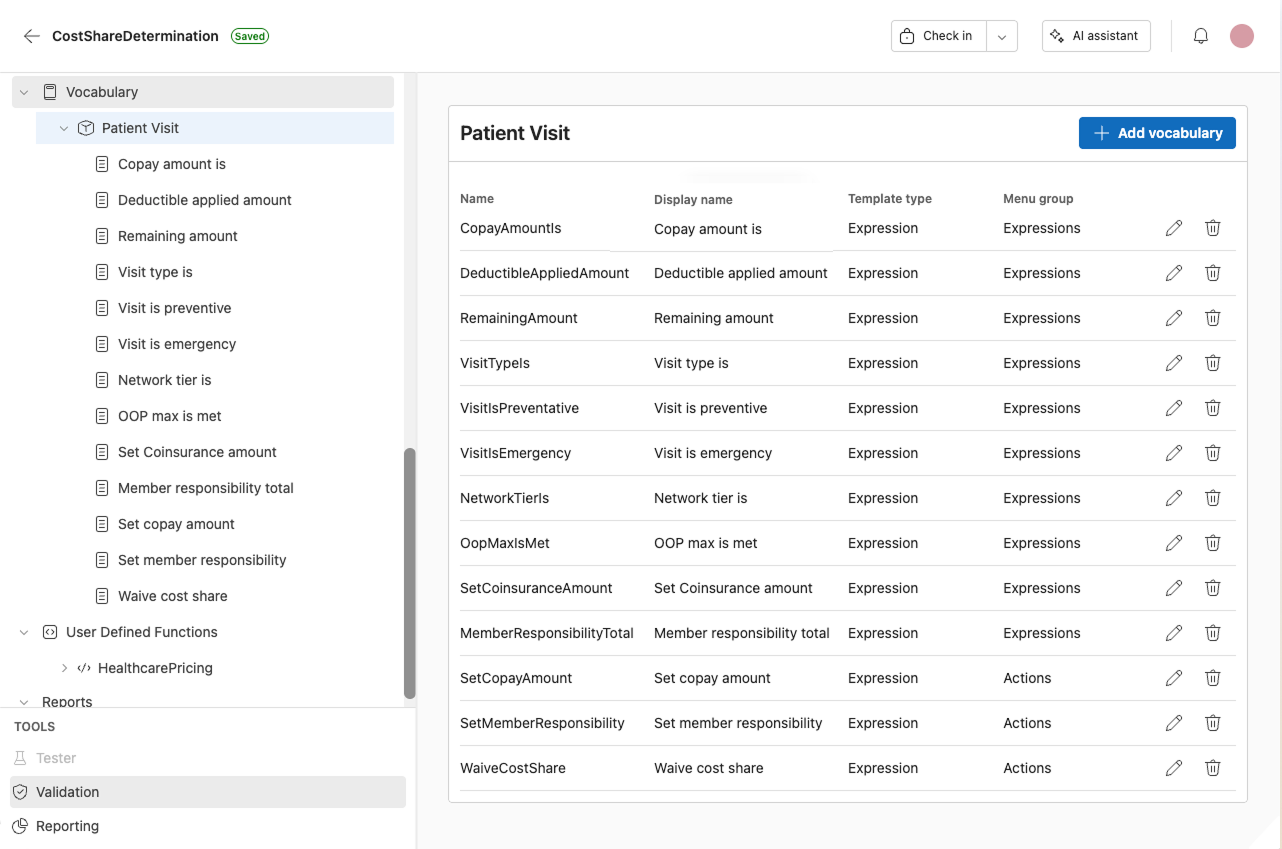
Create a vocabulary template
- Navigate to Vocabulary from the main navigation.
- Select the entity you want to create the template for.
- Select Add to create a new template.
Create a template for another entity
To create a vocabulary template against a different entity:
- In the navigation bar, open the ellipsis menu (...).
- Select the entity you want to create the template for.
Only entities are available in this menu.
Template properties
Every template type shares the properties below.
Template type
Select a template type. See Template types.
Name
Enter the internal identifier for the template.
Display name
Enter the name users will see when selecting the template.
Menu group
Select a menu group:
- Actions
- Expressions
Scope
Under Scope, use the toggles to control where the template can be used.
1. Available for rules and calculations for this entity
When enabled, the template is available when authoring rules and calculations in the context of the entity where the template is defined.
2. Available for rules and calculations for entities referencing this entity
When enabled, the template is also available when authoring rules and calculations in entities that reference the entity where the template is defined.
Example: entities referencing this entity
If you have a parent entity that contains this entity as a collection, the parent entity is referencing this entity.
For example:
- Cost Share Determination (parent entity)
- Patient visits (collection of Patient visits entities)
In this example, Cost Share Determination references Patient visit because Cost Share Determination contains the Patient visits collection.
If the template is created in the Patient visit entity context and you enable Available for rules and calculations for entities referencing this entity, rule authors can use the template when authoring rules and calculations in the Cost Share Determination context.
Business language
Use the Business language text box to define the natural language sentence used by the template.
To define a placeholder in the business language, wrap the placeholder name in dollar signs.
For example:
$Amount$$ServiceDate$$Reason$
The placeholder names used here must match the placeholder Name values configured in the Placeholders section.
Placeholders
In Place holders, select Add to create placeholders used by the template.
For each placeholder, configure:
Name
The placeholder identifier. This must match the placeholder used in the business language string.
Display text
The text shown to the user when they fill in the placeholder.
Accepted types
Select the value types allowed for the placeholder:
- boolean
- date
- datetime
- decimal
- integer
- text
Multiple values
Enable the toggle to allow the placeholder to accept more than one value.
Delete
Select the trashcan icon to delete the placeholder.
Template types
Vocabulary templates come in five types:
Each type below adds its own fields to the shared Template properties above.
Expression template
The Expression template maps a business language sentence to a syntax expression, so authors can reuse a complex expression or use more specific terminology for a field in a given context.
Evaluate to Specify the data type returned by the template:
- boolean
- date
- datetime
- decimal
- integer
- text
Expression Use the expression editor to define the logic that the template generates. The expression uses the placeholder values as inputs.
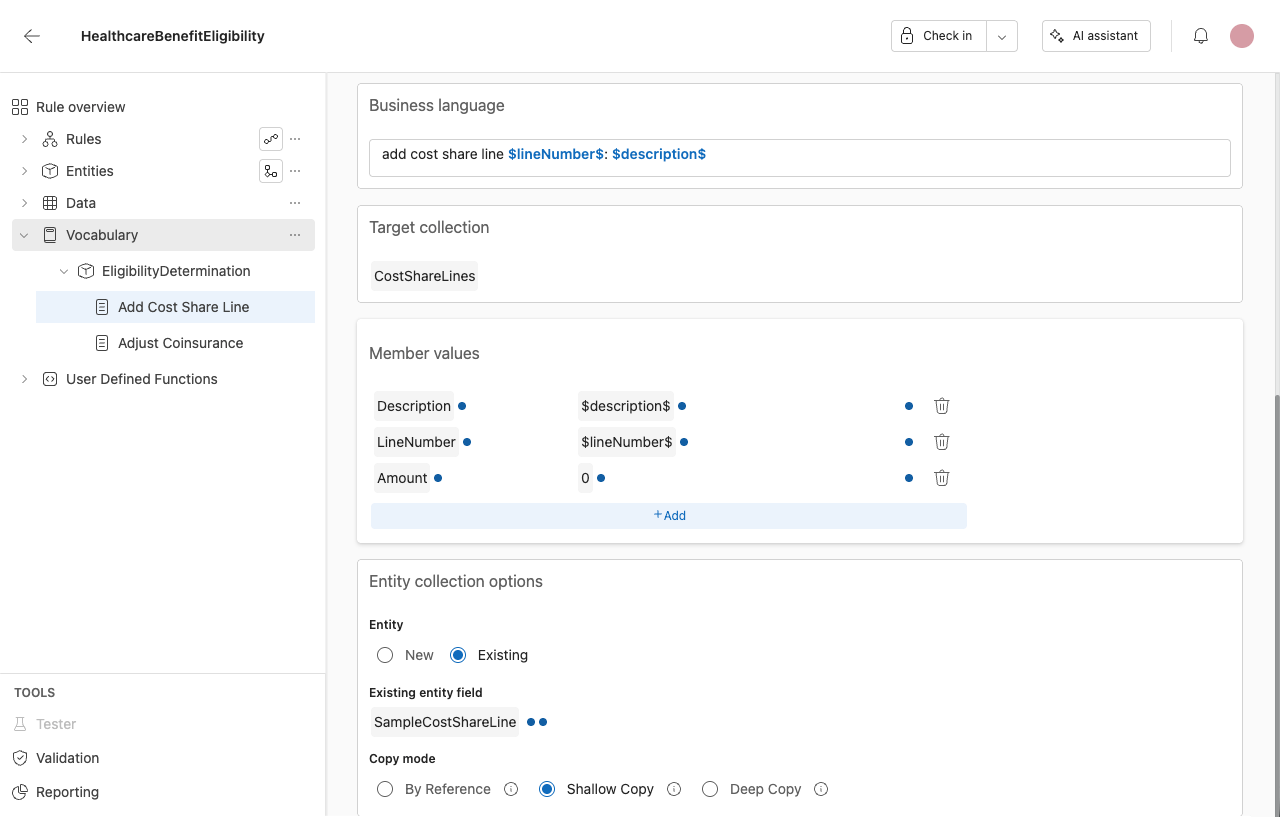
Add Collection Member template
The Add Collection Member template adds a new member to a collection, optionally populating its fields and choosing whether the new member is a new entity or copied from an existing one.
Target collection Select the collection to add a member to, from the entities available in the current context.
Member values Populate fields on the new member using a name/expression grid. Select Add to add a row, then set:
- Name – The field to set on the new member.
- Expression – The value to assign, using any TemplateValue expression or a placeholder.
Entity collection options Configure where the new member comes from:
-
Entity – Choose New to create a new entity, or Existing to copy from one already in context.
-
Existing entity field – Available only when Entity is set to Existing. Select a field that holds a single entity to copy from. This must be a single-entity field, not a collection; the picker only offers compatible fields.
-
Copy mode – Available only when Entity is set to Existing. Choose how the new member relates to the source entity:
- By Reference – The new member points to the same entity as the source. No new entity is created, so the two locations always reflect the same data.
- Shallow Copy – Creates one new entity, copying its primitive field values. Any child entities or collections it contains still reference the original entities from the source.
- Deep Copy – Creates a new entity and recursively creates new copies of every entity and collection it contains, so the result shares no entities with the source.
Assignment template
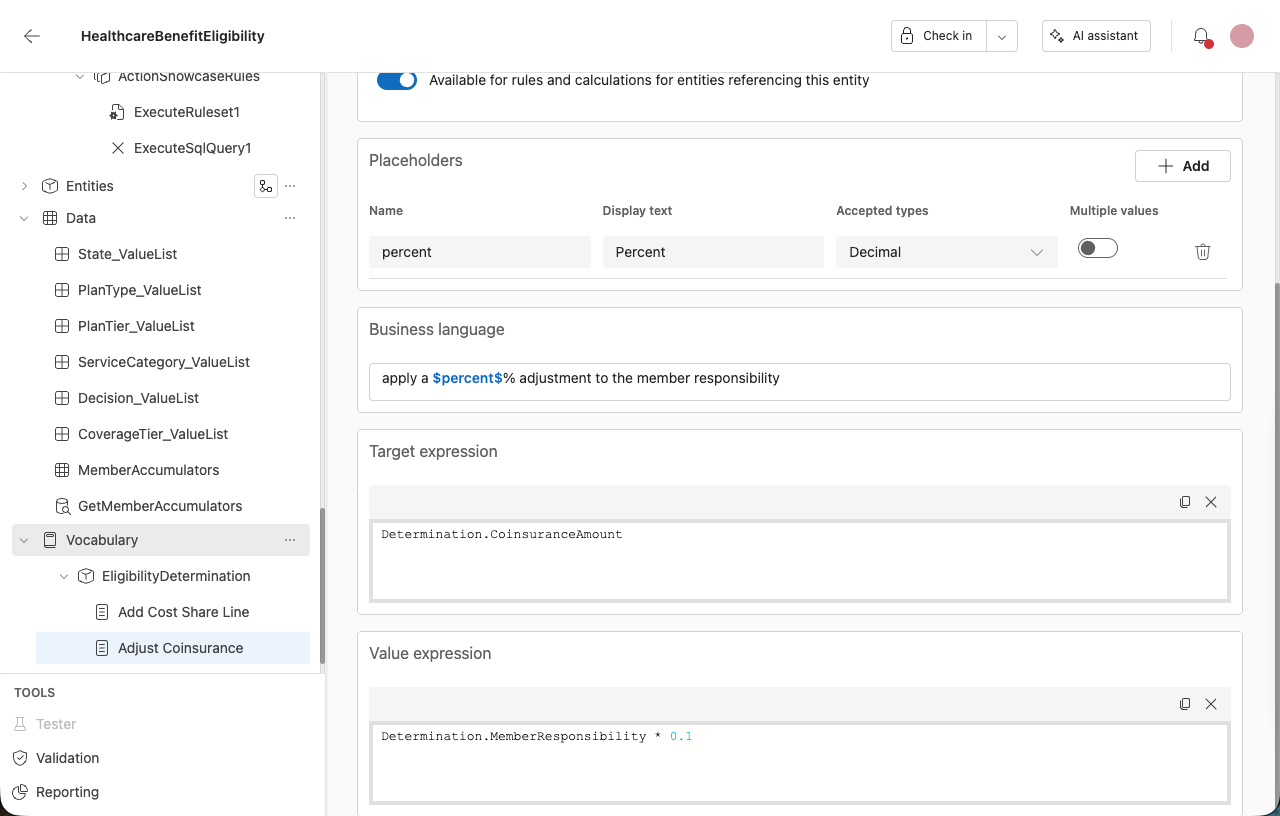
The Assignment template sets a target field to a computed value, expressed in the author's own business language rather than a Set Value action.
Target expression Enter the field or expression the template assigns to.
Value expression Enter the expression that produces the value to assign. This can reference placeholders defined in the Placeholders section.
Execute rule set and Execute member rule set templates
Two template types run a rule set from within a vocabulary template. Both add their own fields to the shared template properties described above.
These are template types in the vocabulary editor. They are different from the Execute rule set and Execute member rule set actions on the Actions page.
Execute rule set
The Execute rule set template runs a target rule set, optionally passing parameters.
Target rule set Enter the rule set to run. This is a single value.
Rule set parameters Map values to the target rule set's parameters using a name/value grid. The grid is keyed by parameter name, and each parameter is mapped to an expression. The value column is labeled Expression.
Execute member rule set
The Execute member rule set template runs a target rule set against each member of a collection, optionally filtering which members are included.
Target collection Select the collection to run against from the entities available in the current context.
Target rule set Enter the rule set to run. This is a single value.
Collection member filter expression Optionally enter an expression to filter which members are included. This is a single value.
Rule set parameters Map values to the target rule set's parameters using the same name/value grid as Execute rule set.
Limitations
Current limitations:
- The target rule set is entered as a single value. It is not picked from a live dropdown.
- Expressions and placeholders are not allowed in the target rule set and collection fields.
- There is no authoring-time validation. Validate the rule application explicitly or on check-in.
Where vocabulary actions and templates appear
- Vocabulary-defined actions are reachable from the main rule and action menu.
- New templates appear in the authoring menus by default.
- Templates can be created against multiple entity contexts from the navigation bar. See Create a template for another entity.
Edit a vocabulary template
- Navigate to Vocabulary.
- Select the entity that contains the template.
- Select the template from the list.
- Update the template fields as needed.